Unit-7 (Favorites page)
Accessing the Unit-7
Clone the unit-7, branch to start this tutorial.
Intro
In this unit we will we building the favorites page.
MovieSection component
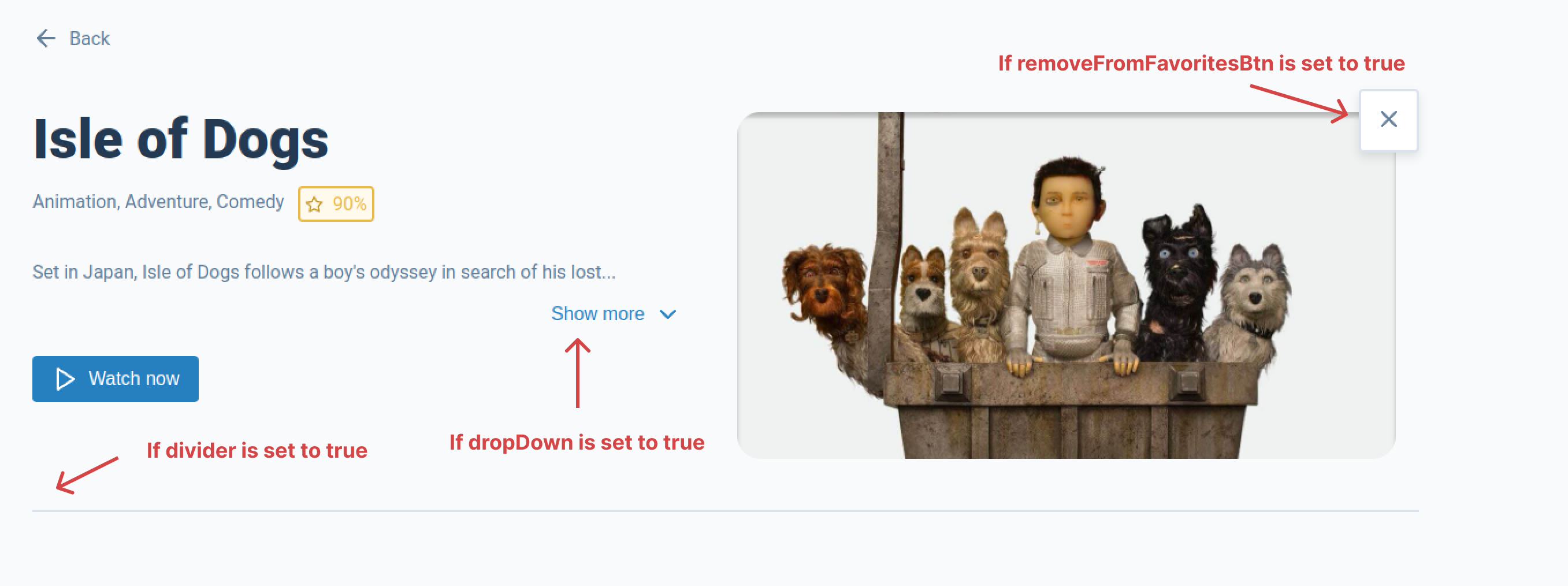
Before we get started we need to take a look at the <MovieSection /> component as some changes have been made to it to allow use to us it in the <Favorites> page component. The <MovieSection /> component now contains the following props:
Props
| Prop | Type | Description |
|---|---|---|
| className | string | This allows a custom styles to be added to the component |
| movieObj | object | Is the movie data object the component needs to display |
| dropDown | bool | If true will change the movie description paragraph into a dropdown |
| removeFromFavoritesBtn | bool | If true renders the favorite button as the remove from favorites button |
| showBackBtn | bool | Set to true by default but if set to false the back button will not be rendered |
| divider | bool | If true renders the divider at the bottom of the component |
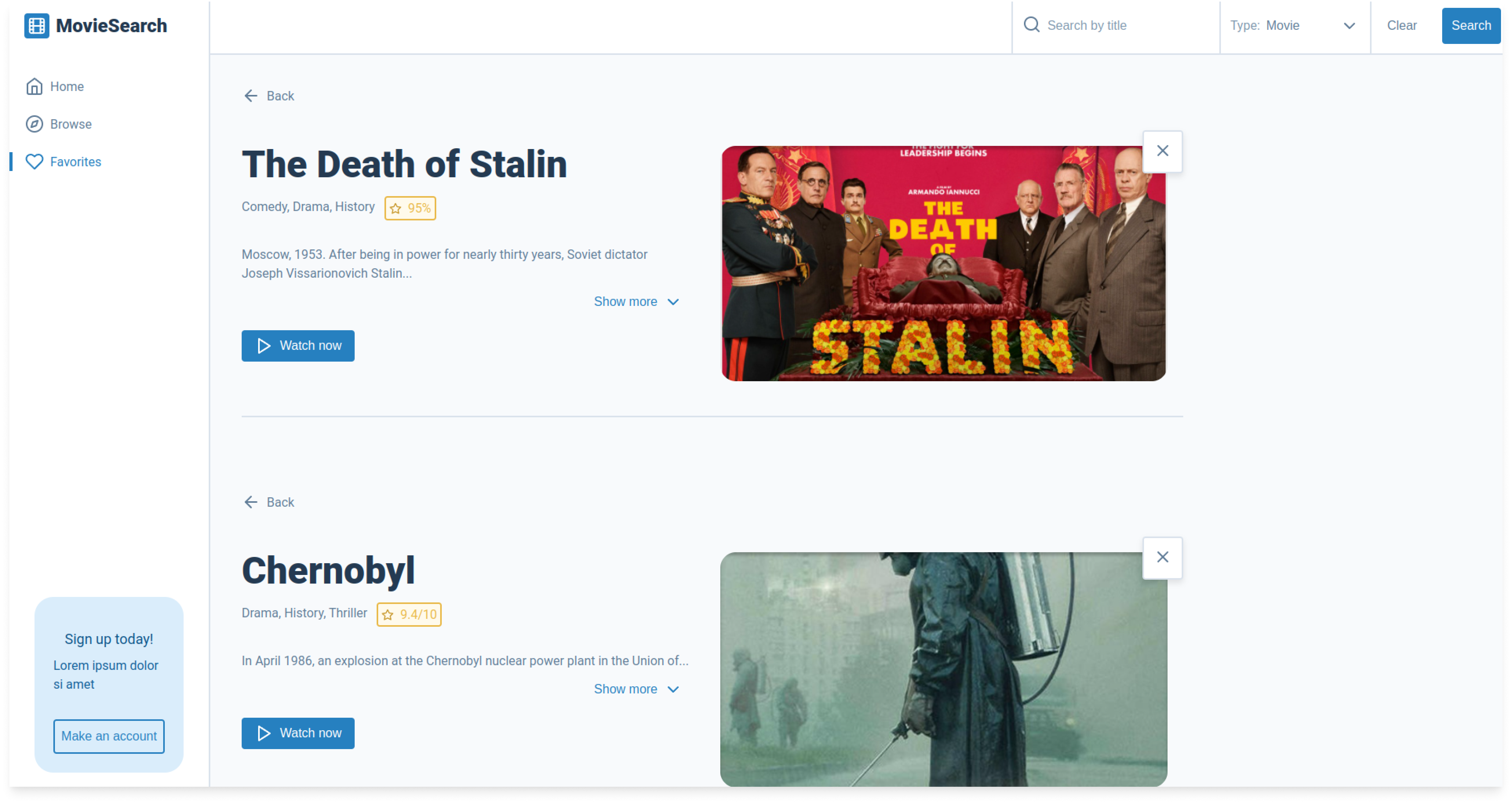
As we want the <MovieSection> component to render as shown in the image bellow, we will need to add the dropDown, removeFromFavoritesBtn and divider props.
Remove from favorites button
Currently the handleRemoveFromFavorites function in the <MovieSection /> component is only console logging "I was removed from favorites".
// TODO: Remove from favorites
const handleRemoveFromFavorites = () => {
  console.log('I was removed from favorites');
};
We need to update this by removing the console.log and adding a dispatch with the "REMOVE_FROM_FAVORITES" action. Remember we will still need to pass in the movieObj as a payload as our reducer will need to know what movie to remove from the store. We won't be able to test this yet because the remove from favorites button is only shown when the <MovieSection /> component has the removeFromFavoritesBtn prop, this prop is not enabled when we render the <MovieSection /> component in the <Movie /> page component. However, when we go to render our <MovieSection /> component in the <Favorites /> page component we will add the removeFromFavoritesBtn prop.
// This will remove a favorite for the favorites store
const handleRemoveFromFavorites = () => {
  dispatch({ type: 'REMOVE_FROM_FAVORITES', payload: movieObj });
};
The Favorites page
We need the <Favorites> page component to do two things, if there are movies stored in the favorites store we need to display them or if there are no movies stored we need some way of telling the user. For now we are going to focus on the latter, informing the user they have no favorites. The first thing we need to do in our <Favorites> page component is import the following:
useSelectorso we can get the data in our favorites storeuseDispatchlater on we will displaying an error toast so we will need ourdispatchfunctionButtonBackwe need the user to have a way to get back to the home page, Note: that our<MovieSection>component has this button however if there are no movies we will not be rendering and<MovieSection>component, so we need to import the<ButtonBack />button separately .SecondaryHeadingwe use this component to render the title "You currently have no favorites saved"
import React from 'react';
import { useSelector, useDispatch } from 'react-redux'; // Added
import styles from './favorites.module.scss';
import ButtonBack from '../../atoms/button-back/button-back'; // Added
import SecondaryHeading from '../../atoms/typography/secondary-heading/secondary-heading'; // Added
Next we need have a way of knowing if there are movies in our favorites store so we will need to use our useSelector.
// Get Favorites from store
const favorites = useSelector((state) => state.favorites.value);
We are also going to show an error toast if the favorites.length < 1. To this all we need to do is declare our dispatch function and fire the "SHOW_TOAST" action with our payload if there are no movies in the favorites store.
// If there are no movies in the favorites store show error toast
const dispatch = useDispatch();
if (favorites.length < 1) {
  dispatch({
    type: 'SHOW_TOAST',
    payload: {
      display: true,
      message: 'You currently have to favorites saved',
      type: 'error',
    },
  });
}
Then we will return the following if our favorites.length < 1 (there are no movies in the favorites store).
// If there are no movies in the favorites store
if (favorites.length < 1) {
  return (
    <div className={styles.favorites}>
      <ButtonBack to="/">
        Back
      </ButtonBack>
      <SecondaryHeading>You currently have no favorites saved</SecondaryHeading>
    </div>
  );
}
But if there are movies in the favorites store we will just return a "test" div.
// If there are movies in the favorites store
return (
  <div>
    Test
  </div>
);
Lastly this is what our completed <Favorites /> page component should look like.
import React from 'react';
import { useSelector, useDispatch } from 'react-redux';
import styles from './favorites.module.scss';
import ButtonBack from '../../atoms/button-back/button-back';
import SecondaryHeading from '../../atoms/typography/secondary-heading/secondary-heading';

const Favorites = () => {
  // Get Favorites from store
  const favorites = useSelector((state) => state.favorites.value);

  // If there are no movies in the favorites store show error toast
  const dispatch = useDispatch();
  if (favorites.length < 1) {
    dispatch({
      type: 'SHOW_TOAST',
      payload: {
        display: true,
        message: 'You currently have to favorites saved',
        type: 'error',
      },
    });
  }

  // If there are no movies in the favorites store
  if (favorites.length < 1) {
    return (
      <div className={styles.favorites}>
        <ButtonBack to="/">
          Back
        </ButtonBack>
        <SecondaryHeading>You currently have no favorites saved</SecondaryHeading>
      </div>
    );
  }

  // If there are movies in the favorites store
  return (
    <div>
      Test
    </div>
  );
};

export default Favorites;
Task
Your task is to replace the following code and render multiple <MovieSection> components using the movies data stored in the favorites store.
// If there are movies in the favorites store
return (
  <div>
    Test
  </div>
);
It should look something like this. Remember you have a new set of props in <MovieSection> component explained in the MovieSection component section in this unit to help you with this.
If you get stuck or get overwhelmed remember you can always get the answers for these tasks on the unit-7-answers page.