Unit-2 answers
Accessing the Unit-2 answers
Clone the unit-2-answers, branch to get the answers to unit-2.
Answer
cardsToShow
First things first, we will start by defining our cardsToShow function, this will return the number of cards we need to
show depending on the screen size.
  // This will give us the width of the viewport every time the window size changes
  const { width } = useWindowDimensions();

  // This will give us the number of cards we need to show depending on the screen size
  const cardsToShow = (arr) => {
    if (width > 1280) {
      return 4;
    }
    if (width > 1040) {
      return 3;
    }
    if (width > 768) {
      return 2;
    }
    return arr.length;
  };
Defining our state
Next we need to define our state, we have to make a copy of movies.popular and assign it to popular variable.
We need to do this as when we run the slice method as it will change the original array and we don't want
this to happen on our movies.popular array. Next we define our startIndex, this is what we will use to
find the index of the first card we want to show. Then we define the endIndex, this will be used to
find the index of the last card we want to show however, we set the original state of endIndex
to cardsToShow(movies.popular). For example, if the screen is greater than 1280px, cardsToShow
will return 4, so our endIndex will be set to 4. Lastly, we need to define our paginatedMovies and
its original state will be set to popular.slice(startIndex, endIndex).
  // Set up the states we will need for our pagination
  let popular = [...movies.popular];
  const [startIndex, setStartIndex] = useState(0);
  const [endIndex, setEndIndex] = useState(cardsToShow(movies.popular));
  const [paginatedMovies, setPaginatedMovies] = useState(popular.slice(startIndex, endIndex));
Next and Previous buttons
Now we need to make our next() and previous() functions, these will update our cards when the user
clicks on the next or previous buttons, remember the next and previous buttons are children of the <PaginationButtons />
component so we will need to pass our functions to the <PaginationButtons /> component as props. After that <PaginationButtons />
will do all the heavy lifting for us, for example disabling and changing the styles of the buttons.
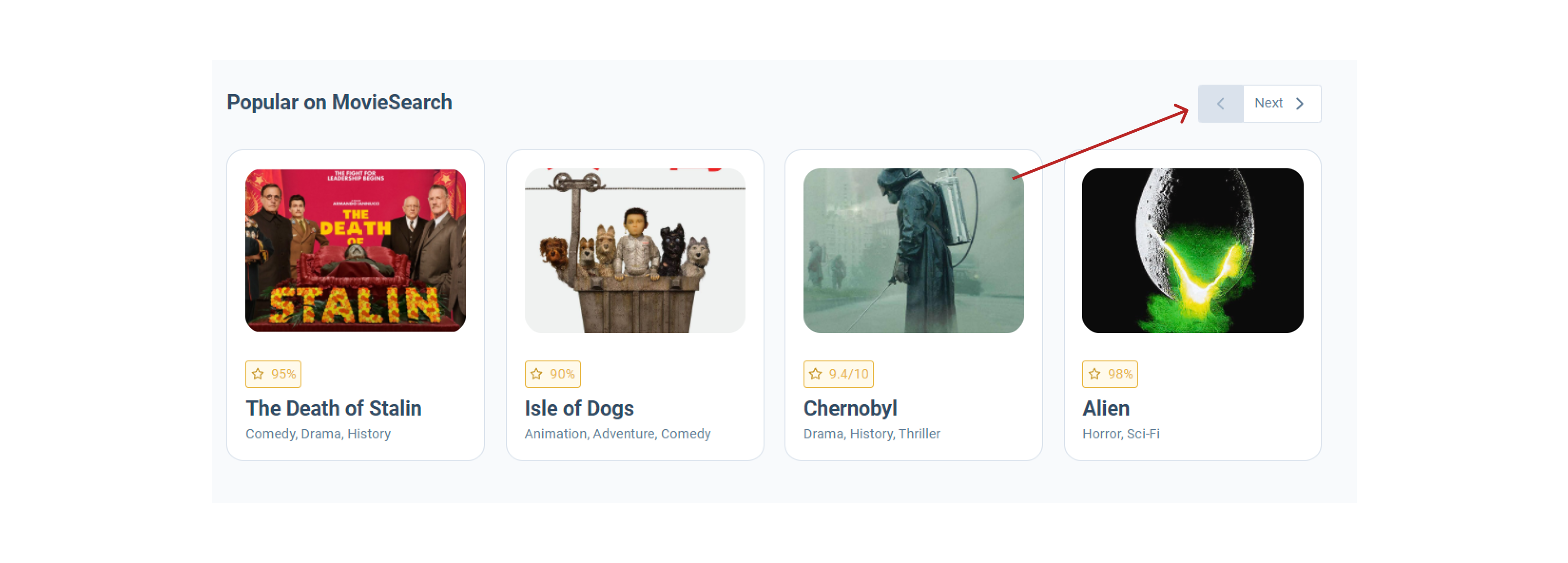
When the next() function is fired, we first need to check if our endIndex state is less than the length of our
movies.popular array. This is because if it isn't these means we have no more cards to show. If our endIndex state is
less than the length of movies.popular we add 1 to the current startIndex and endIndex.
const next = () => {
  if (endIndex < movies.popular.length) {
    setStartIndex(startIndex + 1);
    setEndIndex(endIndex + 1);
  }
};
When the previous() function is fired, we first need to check if our startIndex state is greater than 0, this
is because if our startIndex is 0 this means we can't have any previous card to show. If the startIndex is greater than
0 we need to minus 1 from our current startIndex and endIndex state.
const previous = () => {
  if (startIndex > 0) {
    setStartIndex(startIndex - 1);
    setEndIndex(endIndex - 1);
  }
};
Next we need pass our next() and previous() functions as props to the <PaginationButtons /> component as
previously mentioned. Add we need to set the disableLeft prop to true if the startIndex state is equal to true
and set the disableRight prop to true if the endIndex state is equal to the length of the movies.popular array.
<PaginationButtons
  next={next}
  previous={previous}
  disableLeft={startIndex === 0}
  disableRight={endIndex === movies.popular.length}
/>
Now need to update our paginatedMovies state if the startIndex and endIndex states are updated. We can't do this
in the next() and previous() functions because startIndex and endIndex states are updated after these functions
are fired. This means if we tried to update our paginatedMovies inside these functions our paginatedMovies state
would be set to the old startIndex and endIndex states (an example of this is show below). So we have to use the useEffect hook to check when the
startIndex and endIndex states are updated and then we will update the paginatedMovies to use the new startIndex
and endIndex.
danger
An example of the next() function "trying" to updating the paginatedMovies to use the new startIndex and endIndex
states.
const next = () => {
  if (endIndex < movies.popular.length) {
    setStartIndex(startIndex + 1);
    setEndIndex(endIndex + 1);

    // This will not use the updated startIndex and endIndex states above ^
    // But instead use the old startIndex and endIndex
    popular = [...movies.popular];
    setPaginatedMovies(popular.slice(startIndex, endIndex));
  }
};
// Update paginatedMovies is startIndex or endIndex change
useEffect(() => {
  popular = [...movies.popular];
  setPaginatedMovies(popular.slice(startIndex, endIndex));
}, [startIndex, endIndex]);
Updating the paginatedMovies based on the viewport
If the the view port width changes we want the amount of cards shown to change depending on the the size of the viewport.
Do do this we will need to use the useEffect hook to update the paginatedMovies array to use the startIndex of 0 and the
endIndex of whatever cardsToShow returns. However we will only do this is the width value is updated
// If the width changes reset the pagination
useEffect(() => {
  popular = [...movies.popular];
  setStartIndex(0);
  setEndIndex(cardsToShow(movies.popular));
  setPaginatedMovies(popular.slice(startIndex, endIndex));
}, [width]);
Lastly, we render our paginatedMovies array using the array map method.
{paginatedMovies.map((movie) => (
  <Card movie={movie} key={movie.imdbID} />
))}
Our entire PopularSection component should look like this.
import React, { useState, useEffect } from 'react';
import PropTypes from 'prop-types';
import styles from './popular-section.module.scss';
import SecondaryHeading from '../../atoms/typography/secondary-heading/secondary-heading';
import PaginationButtons from '../../molecules/pagination-buttons/pagination-buttons';
import Card from '../../molecules/card/card';
import useWindowDimensions from '../../../hooks/use-window-dimensions';

const PopularSection = ({ className, movies }) => {
  // This will give us the width of the viewport every time the window size changes
  const { width } = useWindowDimensions();

  // This will give us the number of cards we need to show depending on the screen size
  const cardsToShow = (arr) => {
    if (width > 1280) {
      return 4;
    }
    if (width > 1040) {
      return 3;
    }
    if (width > 768) {
      return 2;
    }
    return arr.length;
  };

  // Set up the states we will need for our pagination
  let popular = [...movies.popular];
  const [startIndex, setStartIndex] = useState(0);
  const [endIndex, setEndIndex] = useState(cardsToShow(movies.popular));
  const [paginatedMovies, setPaginatedMovies] = useState(popular.slice(startIndex, endIndex));

  const next = () => {
    if (endIndex < movies.popular.length) {
      setStartIndex(startIndex + 1);
      setEndIndex(endIndex + 1);
    }
  };

  const previous = () => {
    if (startIndex > 0) {
      setStartIndex(startIndex - 1);
      setEndIndex(endIndex - 1);
    }
  };

  // Update paginatedMovies is startIndex or endIndex change
  useEffect(() => {
    popular = [...movies.popular];
    setPaginatedMovies(popular.slice(startIndex, endIndex));
  }, [startIndex, endIndex]);

  // If the width changes reset the pagination
  useEffect(() => {
    popular = [...movies.popular];
    setStartIndex(0);
    setEndIndex(cardsToShow(movies.popular));
    setPaginatedMovies(popular.slice(startIndex, endIndex));
  }, [width]);

  return (
    <section className={`${styles['popular-section']} ${className}`}>
      <div className={styles['popular-section__title']}>
        <SecondaryHeading className={styles['popular-section__secondary-heading']}>Popular on MovieSearch</SecondaryHeading>
        <div className={styles['popular-section__pagination-buttons']}>
          <PaginationButtons
            next={next}
            previous={previous}
            disableLeft={startIndex === 0}
            disableRight={endIndex === movies.popular.length}
          />
        </div>
      </div>
      <div className={styles['popular-section__cards']}>
        {paginatedMovies.map((movie) => (
          <Card movie={movie} key={movie.imdbID} />
        ))}
      </div>
    </section>
  );
};

PopularSection.propTypes = {
  className: PropTypes.string,
  movies: PropTypes.arrayOf.isRequired,
};

PopularSection.defaultProps = {
  className: '',
};

export default PopularSection;