Unit-5 (Movie page)
Accessing the Unit-5 tutorial
Clone the unit-5, branch to start this tutorial.
Intro
In this unit we will been setting up the navigating to the movie page and our movie page itself. However, firstly lets take a look at the components that have been added/updated to the app they are as follows.
ButtonFavorites
<ButtonFavorites /> (atom) this component will render our favorites button and our remove from favorites button if we set the removeFavorite prop to true. We will also be adding our addToFavorites and removeFromFavorites reducers to the we covered in unit-3 to this component.

Movie Section
We also now have the <MovieSection /> component. We will use this component on the movie page and favorites page to display our movie data. Note this component contains props that will allow us to change some of the styling and what <ButtonFavorites /> is displayed/does depending on what page we want to render it on.
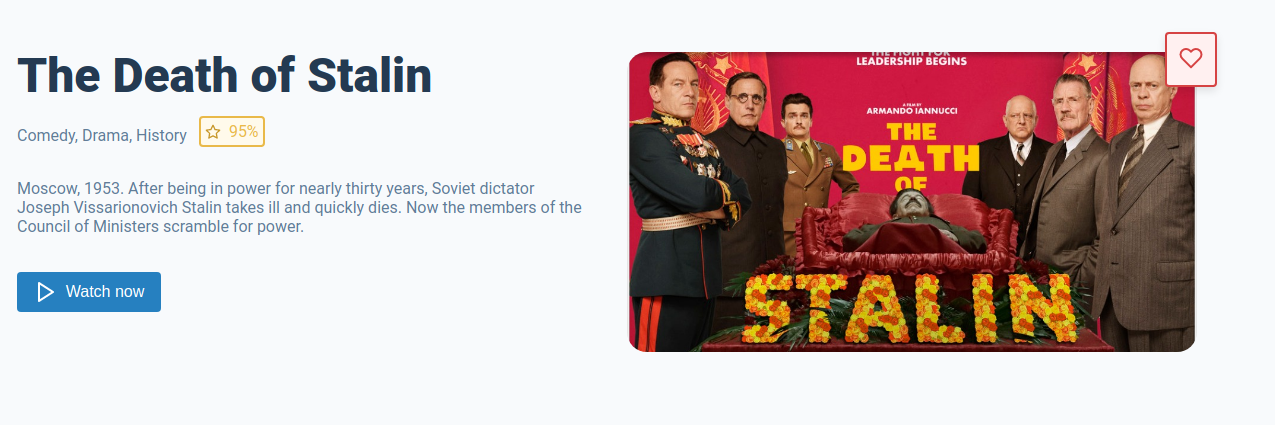
Navigating to the movie page
In unit 3 we added on onClick to our <Card/> component that added our movie data to our store. Now we want to add the same onClick that when clicked navigates to our movie page and shows that movie.
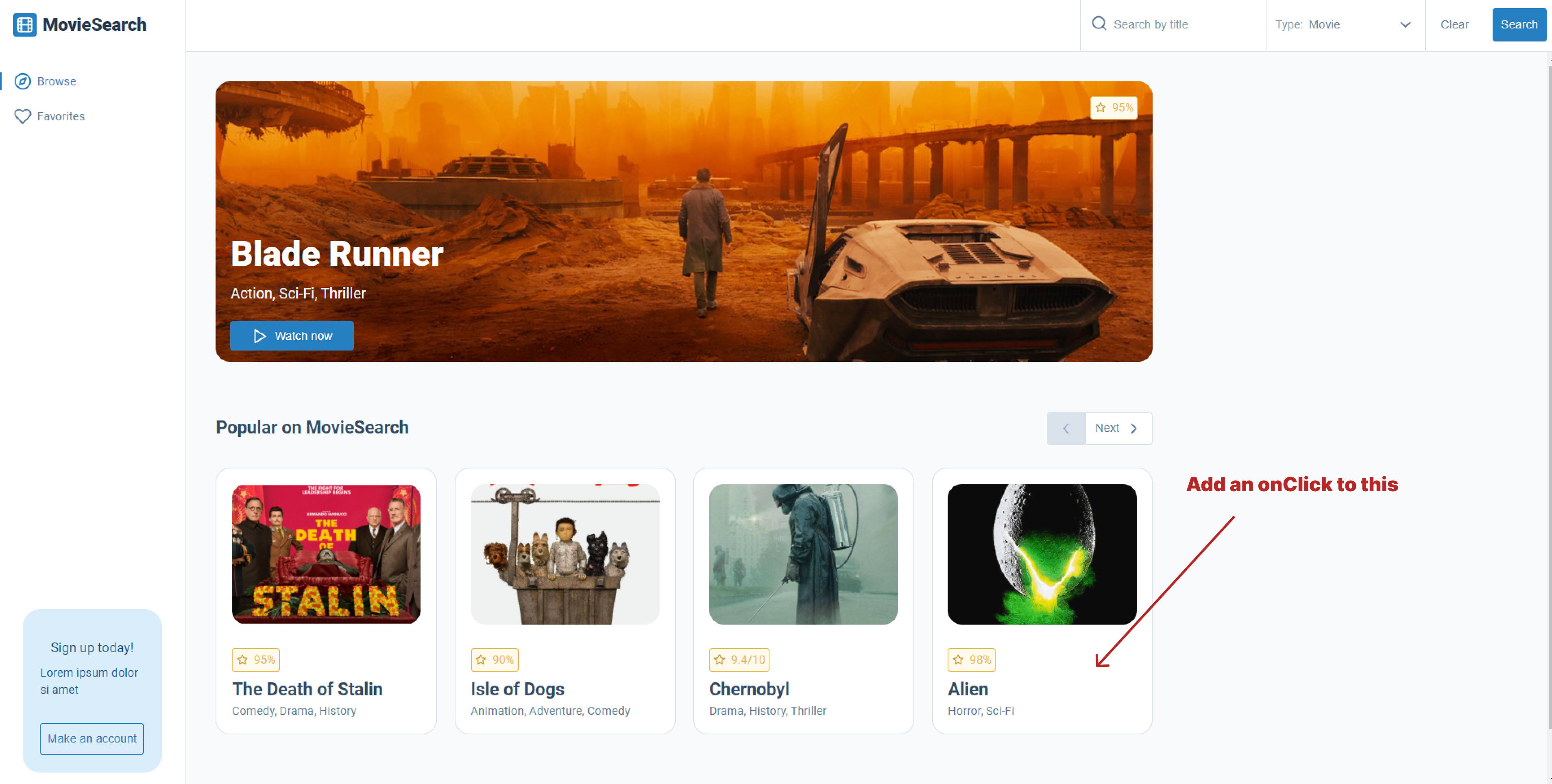
There are a few ways we could achieve this, we could add a our movie ID to our route and then make an API request to get the movie data based on our route ID on the movie page. The problem with this is we would have make another API request for the data we already have. For example, the user searches for a movie using the search form at the top of the page, it takes a few seconds for the data to come back from the API, then they click on a movie and then it take another few seconds to get the data on that movie.
Is there a better way of doing this? Yes, as we already have the movie data on the homepage (default data) or when we get our data back from the API (we will be covering this in a later unit), we could add the data to our store when we click on the movie <Card /> then when we navigate to the movie and just use the data from our store. This would mean that would not need to make another API request to get the movie data.
Setting up our moviesActions and moviesReducer
We need a way of knowing what movie the user has currently selected so that data can be shown on the movie page. But we are not going to use our favoritesActions or favoritesReducer from unit-3, but instead make a new moviesActions and moviesReducer. This is because our currently selected movie is not part of our favorites data so we need to make a new action and reducer for this.
moviesActions
In actions/moviesActions.js we now need to add the following action.
import { createAction } from '@reduxjs/toolkit';

export const setCurrentlySelectedMovie = createAction('SET_CURRENTLY_SELECTED_MOVIE');
moviesReducer
Next we need to add our new moviesReducer toreducers/moviesReducer.js.
import { createReducer } from '@reduxjs/toolkit';
import { setCurrentlySelectedMovie } from '../actions/moviesActions';

const initialState = {
  currentlySelectedMovie: '',
};

const moviesReducer = createReducer(initialState, (builder) => {
  builder
    .addCase(setCurrentlySelectedMovie, (state, action) => {
      state.currentlySelectedMovie = action.payload;
    });
});

export default moviesReducer;
Adding our moviesReducer to the store
Lastly, we just need to add our moviesReducer to the store.
import { configureStore } from '@reduxjs/toolkit';
import favoritesReducer from './reducers/favoritesReducer';
import moviesReducer from './reducers/moviesReducer';

export const store = configureStore({
  reducer: {
    favorites: favoritesReducer,
    movies: moviesReducer,
  },
});
Adding an onClick to the Card component
Next we have to add an onClick to our <Card /> that dispatches our setCurrentlySelectedMovie reducer and then navigates to our movie page.
First lets add our dispatch to our onClick
const dispatch = useDispatch();

const handleClick = () => {
  dispatch({ type: 'SET_CURRENTLY_SELECTED_MOVIE', payload: movie });
};
As we want to navigate to our movie route when our handleClick is fired we have to use useNavigate. However, we are going we want our movie route to contain the currently selected imdbID for example movie/tt5104604, to do that we will need to pass it in as an argument to useNavigate.
const dispatch = useDispatch();
const navigate = useNavigate();

const handleClick = () => {
  dispatch({ type: 'SET_CURRENTLY_SELECTED_MOVIE', payload: movie });
  navigate(`/movie/${imdbID}`);
};
This is what our <Card /> component code should now look like.
import React from 'react';
import PropTypes from 'prop-types';
import { useDispatch } from 'react-redux';
import { useNavigate } from 'react-router-dom';
import styles from './card.module.scss';
import getMovieScore from '../../../utils/getMovieScore';
import StandardImage from '../../atoms/standard-image/standard-image';
import MovieScore from '../../atoms/movie-score/movie-score';
import SecondaryHeading from '../../atoms/typography/secondary-heading/secondary-heading';
import Paragraph from '../../atoms/typography/paragraph/paragraph';
import truncate from '../../../utils/truncate';

const Card = ({ className, movie }) => {
  const {
    Title, Poster, Genre, Ratings, imdbID,
  } = movie;

  const dispatch = useDispatch();
  const navigate = useNavigate();

  const handleClick = () => {
    dispatch({ type: 'SET_CURRENTLY_SELECTED_MOVIE', payload: movie });
    navigate(`/movie/${imdbID}`);
  };

  return (
    <div onClick={handleClick} className={`${className} ${styles.card}`}>
      <div className={styles['card__image-container']}>
        <StandardImage src={Poster} alt={Title} />
      </div>
      <MovieScore score={getMovieScore(Ratings)} />
      <SecondaryHeading>{truncate(Title, 20)}</SecondaryHeading>
      <Paragraph>{Genre}</Paragraph>
    </div>
  );
};

Card.propTypes = {
  className: PropTypes.string,
  movie: PropTypes.shape.isRequired,
};

Card.defaultProps = {
  className: '',
};

export default Card;
Updating our routes
As we now want to navigate to movie/imdbID we need add it as a nested route inside the movie route we already have in app.js.
const App = () => (
  <div className="App">
    <header className="App-header">
      <Layout>
        <Routes>
          <Route path="/" element={<Home />} />
          <Route path="movie" element={<Movie />}>
            <Route path=":movieID" element={<Movie />} />
          </Route>
          <Route path="search-results" element={<SearchResults />} />
          <Route path="favorites" element={<Favorites />} />
          <Route path="*" element={<NoMatch />} />
        </Routes>
      </Layout>
    </header>
  </div>
);
Setting up our movie page component
Lastly, we need to set up our <Movie /> page component to use our new <MovieSection /> component. But before that we need to do a few things:
We first need to be access to our url parameters for example the ID from our route movie/tt5104604 => tt5104604. To do this we need to use useParams() for react-router-dom;
const getParams = useParams();
The we need to get our movie data from our currentlyASelectedMovie and declare useNavigate() so we can use it to navigate back to the home page if needed
const getParams = useParams();
const movieObj = useSelector((state) => state.movies.currentlySelectedMovie);
const navigate = useNavigate();
Next we need to run a few checks before we render our <MovieSection /> component, if any of the following checks fail we will navigate to the home page. Note, we will have to put these checks inside a useEffect hook as we can't all navigate() when the component is first rendered.
We need navigate home if:
- getParams is empty (there is no movie id in the url)
- there is no data in the currentlyASelectedMovie store
- the movie id in the url param is not the same as the imdbID in the currentlyASelectedMovie store
useEffect(() => {
  // If movie title not found set setNavigateToHome to true
  if (Object.entries(getParams).length === 0) {
    navigate('/');
    return;
  }

  // If there is no currentlySelectedMovie setNavigateToHome to true
  if (movieObj === '') {
    navigate('/');
    return;
  }

  // If the ID url param is not the same as the imdbID navigate to home
  const { movieID } = getParams;
  if (movieObj.imdbID !== movieID) {
    navigate('/');
  }
}, []);
Lastly we to have add an if statement around our <MovieSection /> component as it will error on the first render if the movieObj is empty. And we aso need to add an return null to our component as we can't render nothing.
if (movieObj !== '') {
  return (
    <MovieSection movieObj={movieObj} />
  );
}

return null;
Our finished component should look like this
import React, { useEffect } from 'react';
import { useSelector } from 'react-redux';
import { useNavigate, useParams } from 'react-router-dom';
import MovieSection from '../../organisms/movie-section/movie-section';

const Movie = () => {
  // We need to get our params from the url
  const getParams = useParams();

  // Get our currently selected movie
  const movieObj = useSelector((state) => state.movies.currentlySelectedMovie);

  const navigate = useNavigate();

  // We can't call navigate() when the component is first rendered so we must use the useEffect hook
  useEffect(() => {
    // If movie title not found set navigate to home
    if (Object.entries(getParams).length === 0) {
      navigate('/');
      return;
    }

    // If there is no currentlySelectedMovie navigate to home
    if (movieObj === '') {
      navigate('/');
      return;
    }

    // If the ID url param is not the same as the imdbID navigate to home
    const { movieID } = getParams;
    if (movieObj.imdbID !== movieID) {
      navigate('/');
    }
  }, []);

  if (movieObj !== '') {
    return (
      <MovieSection movieObj={movieObj} />
    );
  }

  return null;
};

export default Movie;
Task
Task 1
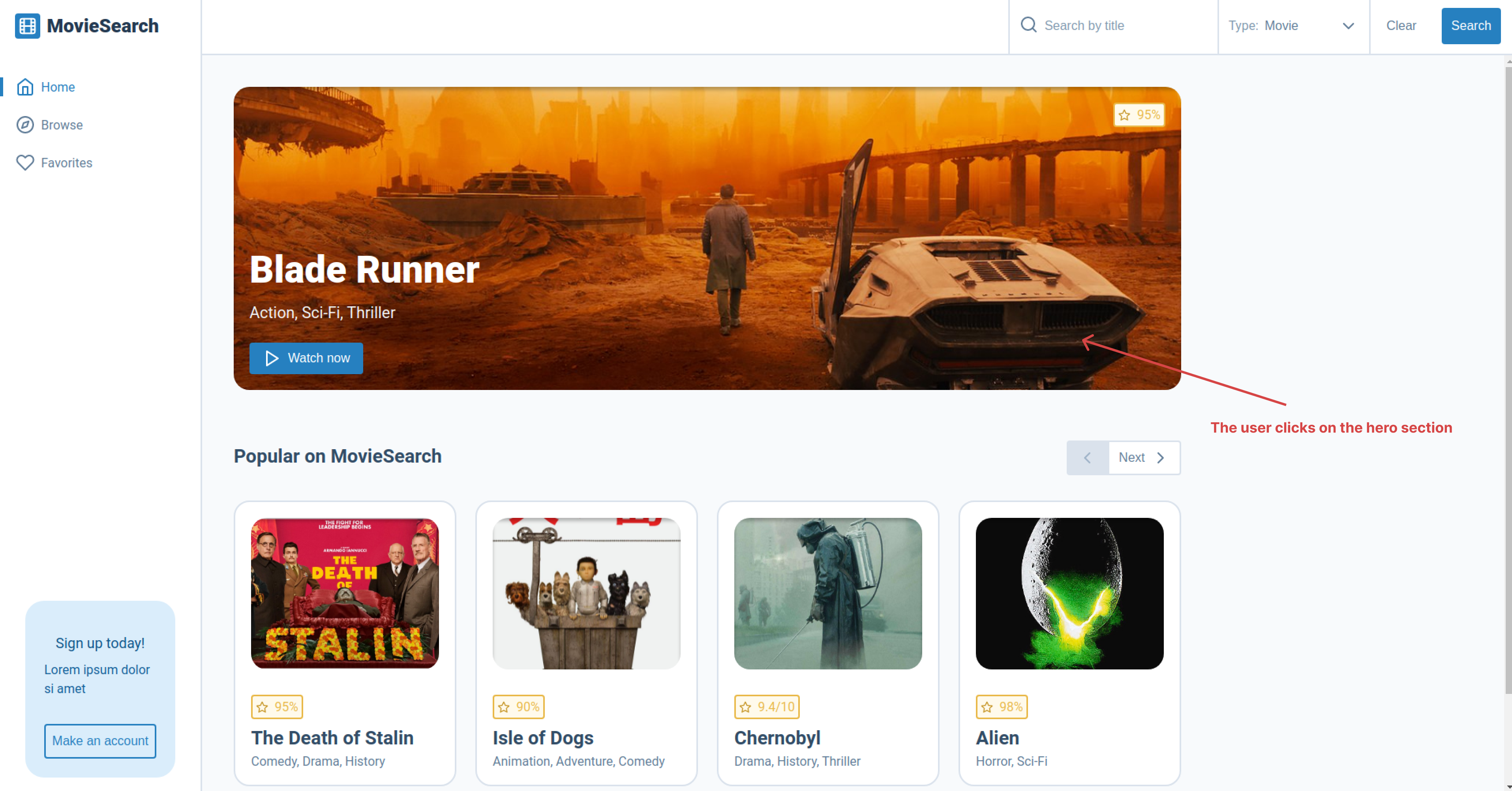
Your first task is to add the the same functionally shown in previous sections to the <HeroSection /> component. For example you will need to add an onClick to the <HeroSection /> component that sets the currentlySelectedMovie to the movie show in the <HeroSection /> component. Then the application should navigate to the movie page and show the same movie as the one on the <HeroSection /> component.
Task 2
Your second task is to add an onClick to the <MovieSection /> when the <ButtonFavorites /> is clicked, this will add the movie to favorite store using your addToFavorites reducer. If the movie is already a favorite the the button will be marked as "alreadySelected" (the ButtonFavorites component has a prop type for this) and the user will not be able to add the movie to the favorites.
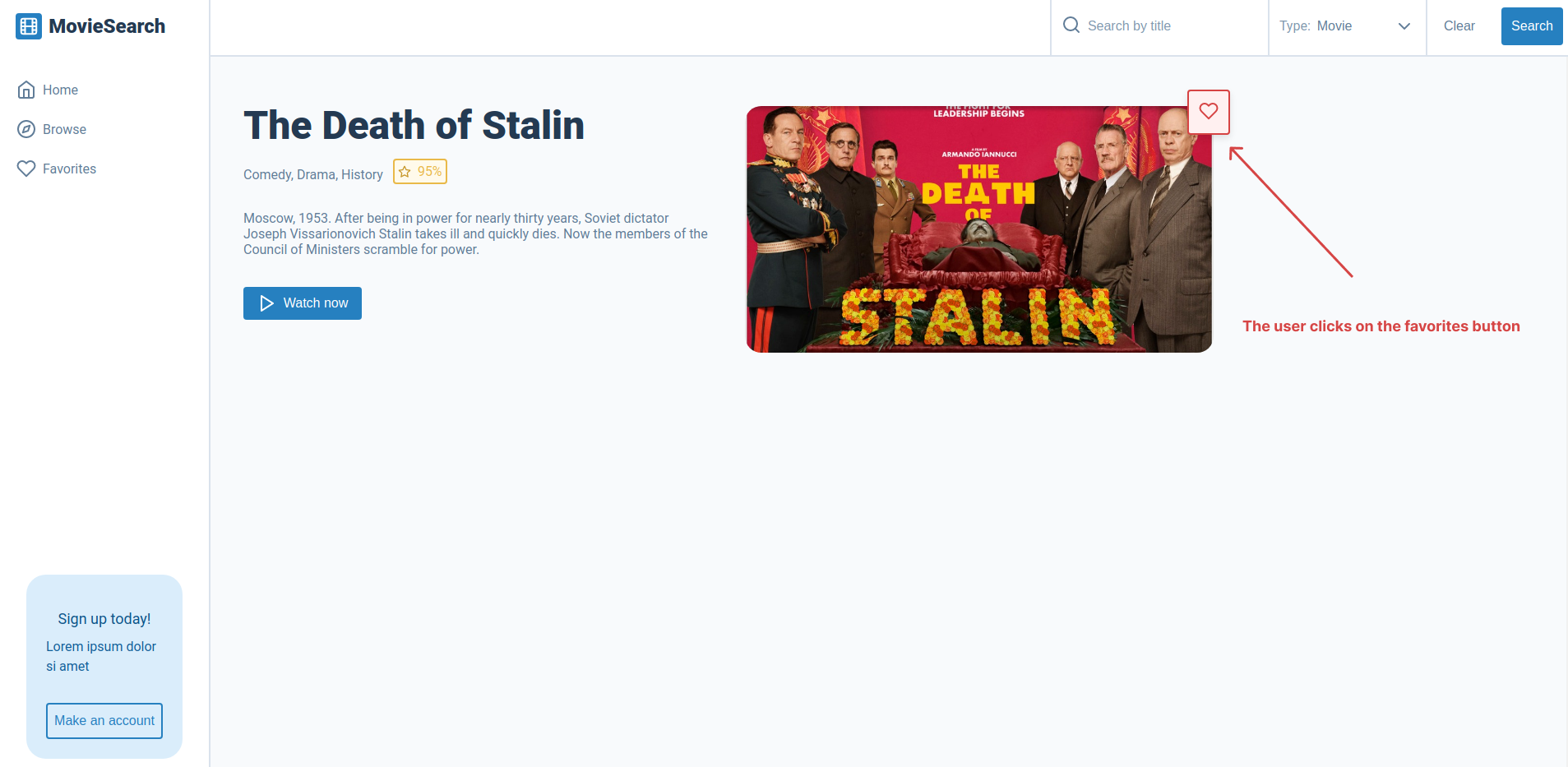
This is what the <ButtonFavorites /> looks like with an without the alreadySelected prop.

If you get stuck or get overwhelmed remember you can always get the answers for these tasks on the unit-5-answers page.